Rent a Car System; Normalized DB, Docker & Java
Implementation of database by advanced design, using EER, and normalization. Implementation of a GUI by java swing, and docker for fast development.
Click Here To See The Project Codebase
Car Rental Management System
A comprehensive Car Rental Management System built with Java Swing for the user interface and MySQL for database management. This project demonstrates advanced database design principles including Entity-Relationship (ER) modeling, Enhanced Entity-Relationship (EER) diagrams, and database normalization, along with a fully functional desktop application for managing car rentals.
📋 Table of Contents
- Project Overview
- Architecture & Design
- Database Design
- Database Scripts
- Docker Setup
- Java Swing Application
- Features
- Installation & Setup
- Usage
- Project Structure
- Technologies Used
- Design Documents
🎯 Project Overview
This Car Rental Management System is a desktop application designed to manage all aspects of a car rental business, including:
- Customer Management: Registration, profile management, and rental history
- Car Inventory Management: Track cars, their models, brands, status, and locations
- Rental Operations: Create, view, and manage rental transactions
- Payment Processing: Handle payments with multiple methods and status tracking
- Maintenance Tracking: Schedule and monitor vehicle maintenance
- Review System: Customer feedback and rating management
- Business Analytics: Comprehensive reporting and statistical functions
The system follows professional software architecture principles with a clear separation between the database layer, business logic, and presentation layer.
🏗️ Architecture & Design

Check the /database/design/EER-design-and-normalization.pdf for more information.
System Architecture
The application follows a three-tier architecture:
- Presentation Layer: Java Swing GUI components providing user interface
- Business Logic Layer: Database stored procedures, functions, and triggers
- Data Layer: MySQL database with normalized schema
Design Principles
- Database Normalization: The database schema is normalized to at least 3NF (Third Normal Form) to eliminate data redundancy and ensure data integrity
- Separation of Concerns: Clear separation between UI, business logic, and data access
- Database-Driven Logic: Business rules enforced at the database level using triggers and constraints
- Rapid Prototyping: Java Swing chosen for fast GUI development and deployment
🗄️ Database Design
Entity-Relationship Model
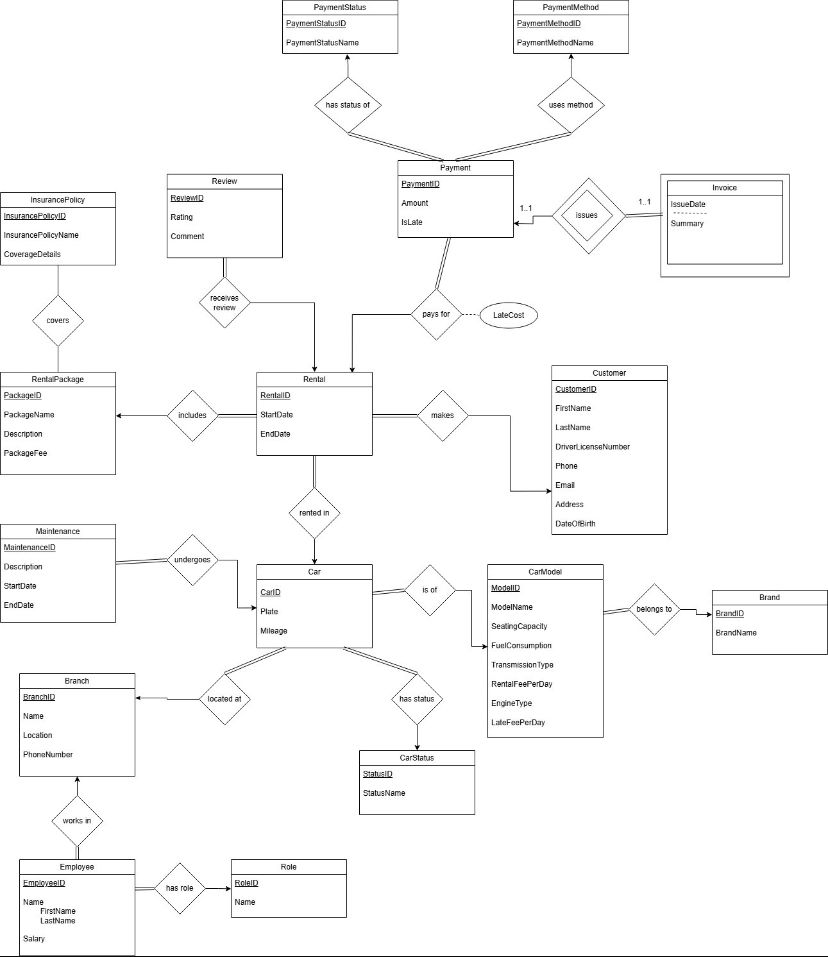
The database design is based on a comprehensive Enhanced Entity-Relationship (EER) diagram that models all business entities and their relationships. The design document provides detailed information about:
- Entities: 18 core entities including Customer, Car, Rental, Payment, Employee, Branch, etc.
- Relationships: Complex relationships with proper cardinalities (one-to-one, one-to-many, many-to-many)
- Attributes: Detailed attribute specifications with data types and constraints
Database Normalization
The database schema has been normalized following standard normalization forms:
- First Normal Form (1NF): All attributes are atomic, no repeating groups
- Second Normal Form (2NF): All non-key attributes fully dependent on primary keys
- Third Normal Form (3NF): No transitive dependencies, all attributes depend only on the primary key
Key Normalization Decisions:
- Separate tables for
BrandandCarModelto avoid redundancy CarStatusas a lookup table to maintain referential integrityPaymentMethodandPaymentStatusas separate entities for flexibility- Junction table
PackagePolicyfor many-to-many relationship between packages and insurance policies
Core Entities
- Customer: Personal information, driver's license, contact details
- Car: Physical vehicles with plate numbers, mileage, status, and location
- CarModel: Model specifications (seating capacity, fuel consumption, transmission, etc.)
- Brand: Car manufacturer information
- Branch: Rental office locations
- Employee: Staff information with roles and branch assignments
- Rental: Rental transactions linking customers, cars, and packages
- RentalPackage: Rental packages (Basic, Standard, Premium) with different features
- InsurancePolicy: Insurance coverage options
- Payment: Payment transactions with methods and status
- Maintenance: Vehicle maintenance records
- Review: Customer feedback and ratings
- Invoice: Billing information
Relationships
- Customer → Rental: One-to-Many (A customer can have multiple rentals)
- Car → Rental: One-to-Many (A car can be rented multiple times)
- RentalPackage → Rental: One-to-Many (A package can be used in multiple rentals)
- RentalPackage ↔ InsurancePolicy: Many-to-Many (Packages can include multiple policies)
- Rental → Payment: One-to-Many (A rental can have multiple payments)
- Car → Maintenance: One-to-Many (A car can have multiple maintenance records)
- Rental → Review: One-to-Many (A rental can receive multiple reviews)
- Car → CarModel: Many-to-One (Multiple cars share the same model)
- CarModel → Brand: Many-to-One (Multiple models belong to the same brand)
- Car → Branch: Many-to-One (Multiple cars located at the same branch)
- Employee → Branch: Many-to-One (Multiple employees work at the same branch)
- Employee → Role: Many-to-One (Multiple employees can have the same role)
📜 Database Scripts
The database is initialized through a series of SQL scripts executed in order:
1. Schema Initialization (1-init-schema.sql)
Creates all database tables with:
- Primary Keys: Auto-incrementing IDs for all entities
- Foreign Keys: Referential integrity constraints
- Check Constraints: Data validation (e.g., age >= 18, positive values)
- Unique Constraints: Prevent duplicate entries (e.g., unique plate numbers, driver's licenses)
- Data Types: Appropriate types (DECIMAL for money, DATE for dates, TEXT for descriptions)
Key Constraints:
- Customer age validation (must be 18+)
- Positive values for fees, amounts, and capacities
- Valid transmission types and engine types
- Seating capacity between 2 and 50
2. Triggers (2-triggers.sql)
Automated business logic enforcement:
SetCarRentedOnRentalInsert: Automatically sets car status to "Rented" when a new rental is createdSetCarAvailableAfterPayment: Sets car status to "Available" when payment is marked as "Paid"SetCarUnderMaintenance: Updates car status to "Under Maintenance" when maintenance record is addedSetPaymentStatusToPaidAfterInvoice: Automatically updates payment status when invoice is issuedcheckcustomerage: Validates customer age before insertion (must be 18+)
3. Functions (3-functions.sql)
Reusable database functions for business calculations:
GetCustomerTotalSpent(customerId): Calculates total amount spent by a customerGetTotalRentalDaysByCar(carId): Sums total rental days for a specific carGetBranchTotalIncome(branchId): Calculates total revenue for a branchGetCustomerAverageRating(customerId): Computes average rating given by a customerIsCarCurrentlyRented(carId): Checks if a car is currently rentedGetPolicyCountByPackage(packageId): Counts insurance policies in a packageGetTopRentedCarModel(): Returns the most frequently rented car modelGetMostValuableCustomer(): Identifies the customer with highest total spendingGetTotalLatePaymentsByCustomer(customerId): Counts late payments for a customerGetAvailableCarsCount(): Returns count of available carsGetTotalRevenue(): Calculates total system revenueGetCustomerRentalCount(customerId): Counts rentals by a customerGetMostRentedBranch(): Identifies the branch with most rentals
4. Views (4-views.sql)
Predefined queries for common reporting needs:
vw_EmployeeDetails: Employee information with roles and branchesvw_RentalInfo: Complete rental information with customer, car, and package detailsvw_PaymentReport: Payment details with customer informationvw_CustomerReviews: Customer reviews with namesvw_CurrentRentals: Active rentals currently in progressvw_LatePayments: List of all late paymentsvw_CarRentalStats: Rental statistics per car
5. Stored Procedures (5-procedures.sql)
Complex business operations:
sp_GetCustomerRentals(custID): Retrieves all rentals for a customersp_AddNewRental(...): Creates a new rental and updates car statussp_GetBranchIncome(branchId): Gets branch income using functionsp_GetCustomerProfile(custId): Comprehensive customer profile with statisticssp_MaintenanceReport(): Complete maintenance reportsp_GetTopRatedCustomers(): Customers with average rating >= 4.5sp_ReviewStatsByCar(carId): Review statistics for a specific carsp_CheckCarAvailability(carId, startDate, endDate): Checks car availability for date rangesp_GetInactiveCustomers(days): Customers inactive for specified dayssp_CalculateRentalCost(rentalId): Calculates total rental cost including late fees
6. Sample Data (6-insert.sql)
Comprehensive test data including:
- 3 branches (Istanbul, Ankara, Izmir)
- 6 employee roles
- 20 customers with diverse profiles
- 10 employees across branches
- 5 car statuses
- 20 car brands
- 30+ car models with specifications
- 70+ cars with various statuses
- 3 rental packages (Basic, Standard, Premium)
- 3 insurance policies
- 20+ rental transactions
- 20+ payments with various statuses
- 20 invoices
- 9 customer reviews
- 10 maintenance records
🐳 Docker Setup
The project includes Docker Compose configuration for rapid development environment setup.
Docker Configuration (database/docker-compose.yaml)
services:
  mysql:
    image: mysql
    container_name: rent-a-car-mysql
    environment:
      MYSQL_ROOT_PASSWORD: 12345678
      MYSQL_DATABASE: rentacar
    ports:
      - "3306:3306"
    volumes:
      - ./scripts:/docker-entrypoint-initdb.d
Features:
- Automatic Database Initialization: All SQL scripts in
./scriptsare automatically executed on container startup - Port Mapping: MySQL accessible on standard port 3306
- Persistent Data: Database persists between container restarts
- Quick Setup: Single command to start entire database environment
Benefits:
- Consistency: Same database environment across all developers
- Isolation: No need to install MySQL locally
- Speed: Fast setup and teardown
- Reproducibility: Identical database state every time
🖥️ Java Swing Application
Application Architecture
The Java application uses Java Swing for the graphical user interface, chosen for:
- Rapid Prototyping: Fast development of desktop applications
- Cross-Platform: Runs on Windows, macOS, and Linux
- Native Look and Feel: Professional appearance with Nimbus LAF
- No External Dependencies: Built into Java, no additional frameworks needed
Application Components
1. Main Menu (MainMenu.java)
- Central navigation hub
- Buttons for accessing all major features
- Clean, intuitive interface
2. View Rentals (ViewRentalsForm.java)
- Displays all rental transactions in a table
- Shows rental details including customer, car, dates, and package
- Real-time data from database
3. Add Rental (AddRentalForm.java)
- Form for creating new rental transactions
- Dropdown menus for:
- Customer selection
- Available cars (only shows cars with "Available" status)
- Rental packages
- Date input for start and end dates
- Uses stored procedure
sp_AddNewRentalfor transaction creation - Automatic car status update via trigger
4. View Customers (ViewCustomersForm.java)
- Table view of all registered customers
- Customer details including contact information
- Driver's license numbers
5. View Cars (ViewCarsForm.java)
- Complete car inventory display
- Shows car details, models, brands, status, and branch location
- Real-time status updates
6. Functions (FunctionsForm.java)
- Interactive interface for executing database functions
- 14 different business functions accessible via buttons
- Input dialogs for parameterized functions
- Output display area showing results
- Functions include:
- Customer analytics (total spent, rental count, average rating)
- Car analytics (rental days, availability check)
- Branch analytics (total income)
- System-wide analytics (total revenue, available cars count)
- Top performers (most valuable customer, top rented model, most rented branch)
Database Connection (DBConnection.java)
Centralized database connection management:
- Singleton Pattern: Single connection point
- JDBC Connection: MySQL Connector/J driver
- Connection String:
jdbc:mysql://localhost:3306/rentacar - Credentials: Configurable user and password
- Error Handling: Proper exception management
Key Features
- Real-Time Data: All views show current database state
- Data Validation: Input validation at both UI and database levels
- Error Handling: User-friendly error messages
- Transaction Management: Database transactions ensure data consistency
- Responsive UI: Clean, professional interface with proper layouts
✨ Features
Core Functionality
-
Customer Management
- Register new customers
- View customer profiles
- Track customer rental history
- Calculate customer statistics (spending, ratings, late payments)
-
Car Management
- View complete car inventory
- Track car status (Available, Rented, Under Maintenance, etc.)
- Monitor car mileage
- View car models and brands
-
Rental Operations
- Create new rental transactions
- View all rentals
- Automatic car status updates
- Rental cost calculation
-
Payment Processing
- Multiple payment methods (Credit Card, Cash, Online, Bank Transfer)
- Payment status tracking (Paid, Pending, Failed)
- Late payment detection
- Automatic invoice generation
-
Maintenance Tracking
- Schedule vehicle maintenance
- Track maintenance history
- Automatic status updates
-
Review System
- Customer ratings (1-5 stars)
- Review comments
- Average rating calculations
-
Business Analytics
- Total revenue tracking
- Branch performance analysis
- Customer value analysis
- Car utilization statistics
- Top performers identification
Advanced Features
- Database Triggers: Automated business logic enforcement
- Stored Procedures: Complex operations encapsulated in database
- Database Functions: Reusable calculations
- Views: Predefined queries for reporting
- Data Integrity: Constraints and validations at database level
- Docker Integration: Easy development environment setup
🚀 Installation & Setup
Prerequisites
- Java Development Kit (JDK): Version 17 or higher
- Maven: For dependency management and building
- Docker & Docker Compose: For database setup (optional, can use local MySQL)
- MySQL: Version 8.0 or higher (if not using Docker)
Step 1: Clone the Repository
git clone <repository-url>
cd carrentalsystem
Step 2: Database Setup
Option A: Using Docker (Recommended)
cd database
docker-compose up -d
This will:
- Start MySQL container
- Create database
rentacar - Execute all SQL scripts automatically
- Set root password to
12345678
Option B: Manual MySQL Setup
- Create MySQL database:
CREATE DATABASE rentacar;
- Execute SQL scripts in order:
mysql -u root -p rentacar < database/scripts/1-init-schema.sql
mysql -u root -p rentacar < database/scripts/2-triggers.sql
mysql -u root -p rentacar < database/scripts/3-functions.sql
mysql -u root -p rentacar < database/scripts/4-views.sql
mysql -u root -p rentacar < database/scripts/5-procedures.sql
mysql -u root -p rentacar < database/scripts/6-insert.sql
Step 3: Configure Database Connection
Edit src/main/java/carrentalsystem/DBConnection.java if needed:
private static final String URL = "jdbc:mysql://localhost:3306/rentacar";
private static final String USER = "root";
private static final String PASSWORD = "12345678";
Step 4: Build the Project
mvn clean compile
Step 5: Run the Application
mvn exec:java -Dexec.mainClass="carrentalsystem.CarRentalSystem"
Or run directly from your IDE:
- Open the project in IntelliJ IDEA, Eclipse, or NetBeans
- Run
CarRentalSystem.java
📖 Usage
Starting the Application
- Ensure MySQL database is running (Docker or local)
- Launch the application
- Main menu will appear with navigation options
Creating a Rental
- Click "Add Rental" from main menu
- Select customer from dropdown
- Select an available car (only available cars are shown)
- Select rental package (Basic, Standard, or Premium)
- Enter start date (YYYY-MM-DD format)
- Enter end date (YYYY-MM-DD format)
- Click "Submit"
- Car status automatically updates to "Rented"
Viewing Data
- View Rentals: Click "View Rentals" to see all rental transactions
- View Customers: Click "View Customers" to see all registered customers
- View Cars: Click "View Cars" to see complete car inventory
Using Database Functions
- Click "Functions" from main menu
- Click any function button
- Enter required parameters when prompted (for parameterized functions)
- View results in the output area
Example Functions:
- Total Revenue: Shows system-wide total revenue
- Available Cars Count: Shows number of available cars
- Most Valuable Customer: Identifies top-spending customer
- Top Rented Car Model: Shows most popular car model
📁 Project Structure
carrentalsystem/
│
├── database/
│   ├── design/
│   │   ├── EER-design-and-normalization.pdf    # Complete database design document
│   │   └── EER.jpeg                             # Entity-Relationship diagram image
│   ├── docker-compose.yaml                     # Docker configuration
│   └── scripts/
│       ├── 1-init-schema.sql                   # Table creation
│       ├── 2-triggers.sql                      # Database triggers
│       ├── 3-functions.sql                     # Database functions
│       ├── 4-views.sql                         # Database views
│       ├── 5-procedures.sql                    # Stored procedures
│       └── 6-insert.sql                        # Sample data
│
├── src/
│   └── main/
│       ├── java/
│       │   └── carrentalsystem/
│       │       ├── CarRentalSystem.java         # Main entry point
│       │       ├── DBConnection.java            # Database connection manager
│       │       ├── MainMenu.java               # Main menu GUI
│       │       ├── AddRentalForm.java          # Add rental form
│       │       ├── ViewRentalsForm.java        # View rentals form
│       │       ├── ViewCustomersForm.java      # View customers form
│       │       ├── ViewCarsForm.java           # View cars form
│       │       ├── FunctionsForm.java          # Database functions interface
│       │       └── TestConnection.java         # Connection test utility
│       └── resources/
│
├── target/                                      # Maven build output
├── pom.xml                                      # Maven configuration
├── README.md                                    # This file
└── LICENSE                                      # License file
🛠️ Technologies Used
Backend & Database
- MySQL 8.0+: Relational database management system
- SQL: Database queries, stored procedures, functions, triggers
- Docker: Containerization for database setup
Frontend
- Java Swing: Desktop GUI framework
- Java JDK 17: Programming language and runtime
Build Tools
- Maven: Dependency management and build automation
- MySQL Connector/J 8.0.33: JDBC driver for MySQL
Development Tools
- IntelliJ IDEA / Eclipse / NetBeans: IDE support
- Git: Version control
📄 Design Documents
Database Design Documentation
The complete database design is documented in:
-
EER Design and Normalization PDF
- Complete Entity-Relationship model
- Normalization process and decisions
- Entity descriptions and attributes
- Relationship specifications
- Final relational schema
-
- Visual representation of all entities
- Relationship lines with cardinalities
- Entity attributes
- Primary and foreign keys
Key Design Highlights
- 18 Core Entities: Comprehensive business model
- Normalized Schema: 3NF normalization eliminates redundancy
- Referential Integrity: Foreign key constraints ensure data consistency
- Business Logic in Database: Triggers and procedures enforce rules
- Scalable Design: Can accommodate business growth
🎓 Learning Outcomes
This project demonstrates:
- Database Design: ER modeling, normalization, schema design
- SQL Programming: Advanced SQL including triggers, functions, procedures, views
- Java Desktop Development: Swing GUI development
- Database Integration: JDBC connectivity and operations
- Software Architecture: Multi-tier architecture, separation of concerns
- DevOps: Docker containerization for development environments
- Best Practices: Code organization, error handling, data validation
📝 Notes
- Database Credentials: Default MySQL root password is
12345678(change in production) - Date Format: Use
YYYY-MM-DDformat for dates in the application - Car Availability: Only cars with "Available" status can be rented
- Age Validation: Customers must be 18+ years old (enforced by trigger)
- Automatic Updates: Car status updates automatically via triggers
👤 Author
Cansu Gün
📜 License
See LICENSE file for details.
🙏 Acknowledgments
- Database design based on advanced EER modeling principles
- Java Swing for rapid desktop application development
- MySQL for robust relational database management
- Docker for simplified development environment setup
Built with ❤️ for demonstrating professional software development practices